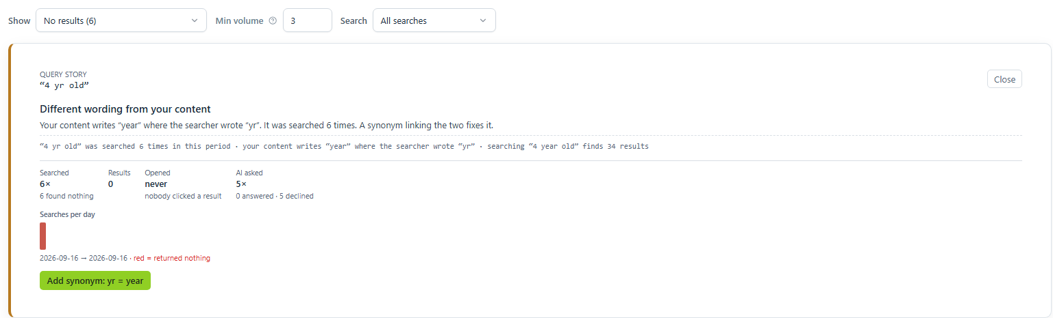
A search found nothing
Answer Buddy can tell you why a search failed, and the one fix that stops it happening again.
- Go to Overview, then Worklist.
- Set Show to No results.
- Click the search. Its full story opens, with a headline that names the cause.
- If there is a fix button, click it. It opens the right screen with the details filled in.
What the explanation can say
| Headline | What it means | Fix |
|---|---|---|
| Different wording from your content | Your content says one word where the member typed another, such as "yr" and "year". | Button: Add synonym: yr = year |
| A misspelling this search does not correct | A spelling mistake search does not fix yet. | Button: Add synonym |
| A misspelling that search now corrects | It is already fixed. | Nothing to do |
| Matching pages exist but search does not show them | The page is there but ranks too low. | Button: Pin a result |
| These pages are excluded from this search | The pages exist, but this search box does not cover them. | Button: Review this search's scope |
| The answer is in members-only content | Only signed-in members can find it. That is correct. | Nothing to do |
| Nothing in your content covers this | No page on your website is about this. | Add content, or write an answer |
| No page answers this | Pages mention the words, but none answers the question. | Add a short, plain answer to the most relevant page |
| A search that was not finished | People kept typing and found what they wanted. | Nothing to do |
| Not a real search | A test, or random key presses. | Nothing to do |
| This search returns results now | It has been fixed since. | Nothing to do |
A search that happened only once is usually someone typing. Act when the same search comes up again.