
Restricting access to surveys
As part of the standard Survey Buddy install, you are given a Survey Builder page that lists all of the surveys you create. Any staff member that is given access to this page, will therefore be able to access all surveys.
It is however possible, to create multiple survey builder pages that contain their own lists of surveys. You can then create a separate sitemap within iMIS RiSE to point to your page. Using standard iMIS security you can then restrict which staff members can access this page. A common example would be to have separate lists of surveys for different departments (e.g. Events team, Membership team and so on).
To do this, you can:
- Make a copy of the default survey builder page found under RiSE-Page Builder-Manage Content - @/Pseudocode/survey-buddy/Survey-Buddy-Install/Surveys
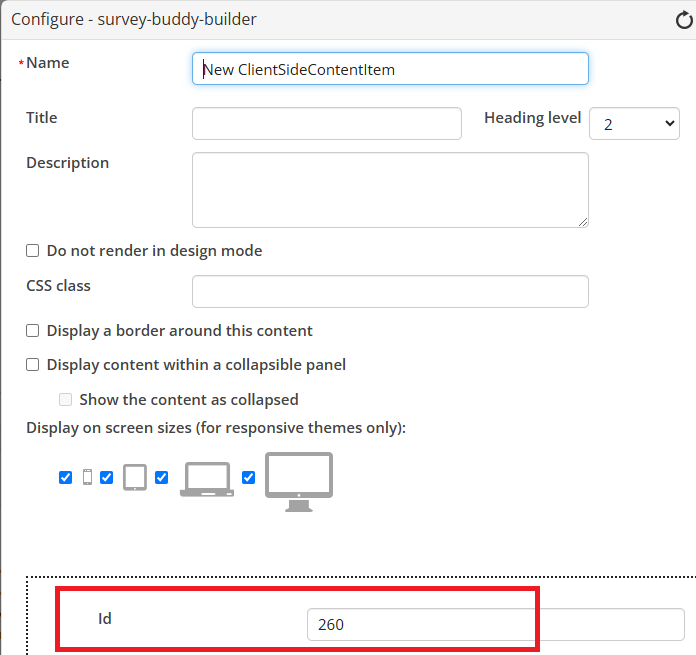
- Within your copy, configure the Survey Builder iPart and set a different ID value to what was set within the original page. This can be any valid iMIS ID, it just has to be different to any IDs you have used on other Survey Builder pages.
- You can then create a new sitemap for the staff website under RiSE-Site Builder-Manage Sitemaps, that points to your new page. Within the ‘Access Settings’ of the sitemap, you can restrict access. Using Roles or Groups would be the typical way to do this.
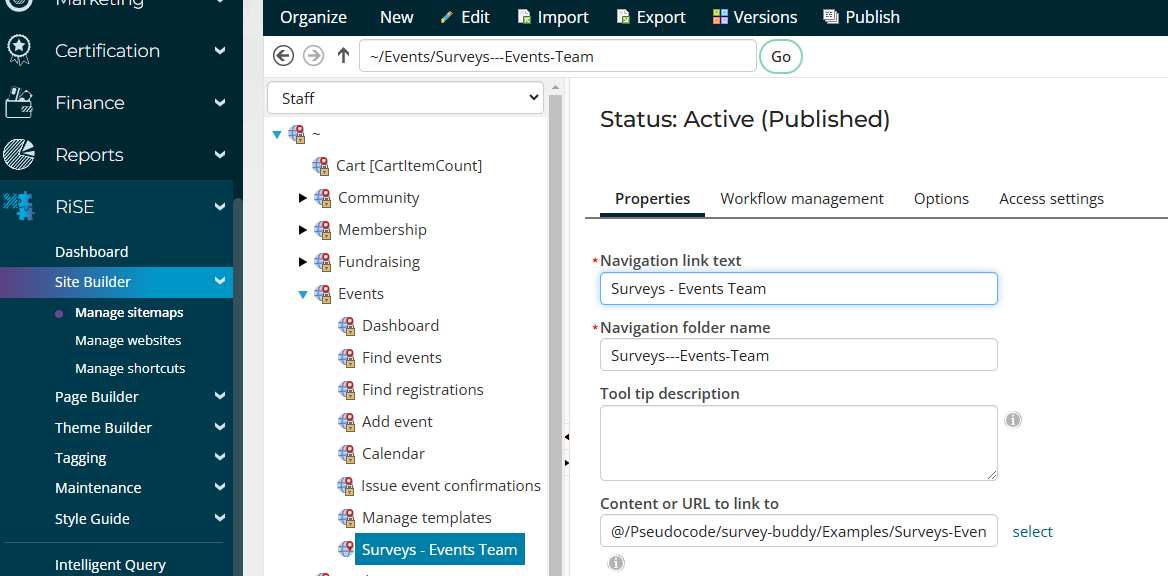
This sitemap can be placed anywhere you like. In the example below, it has been placed under the Events module to provide a list of surveys that is restricted to the Events Team.
